Manage patients, dental treatments, appointments, payments, and reports through one intelligent system on your clinic's computers and your phone, designed to simplify your clinic's daily operations.
The front desk books the visit, the doctor charts the treatment, and the payment lands on the patient's account. Every step happens in the same application, so nothing is copied between notebooks, spreadsheets and phones.
Choose a workspace to see it
Profiles, history, X-rays, documents and notes.
Features
Built around the way a dental clinic works
Each area of the application is designed for one part of the clinic's day, and every list in it can be shaped to your clinic.
Dashboard
Start every day knowing exactly where the clinic stands
The dashboard opens on today: who is coming, what has been collected, and which patients need a follow-up call.
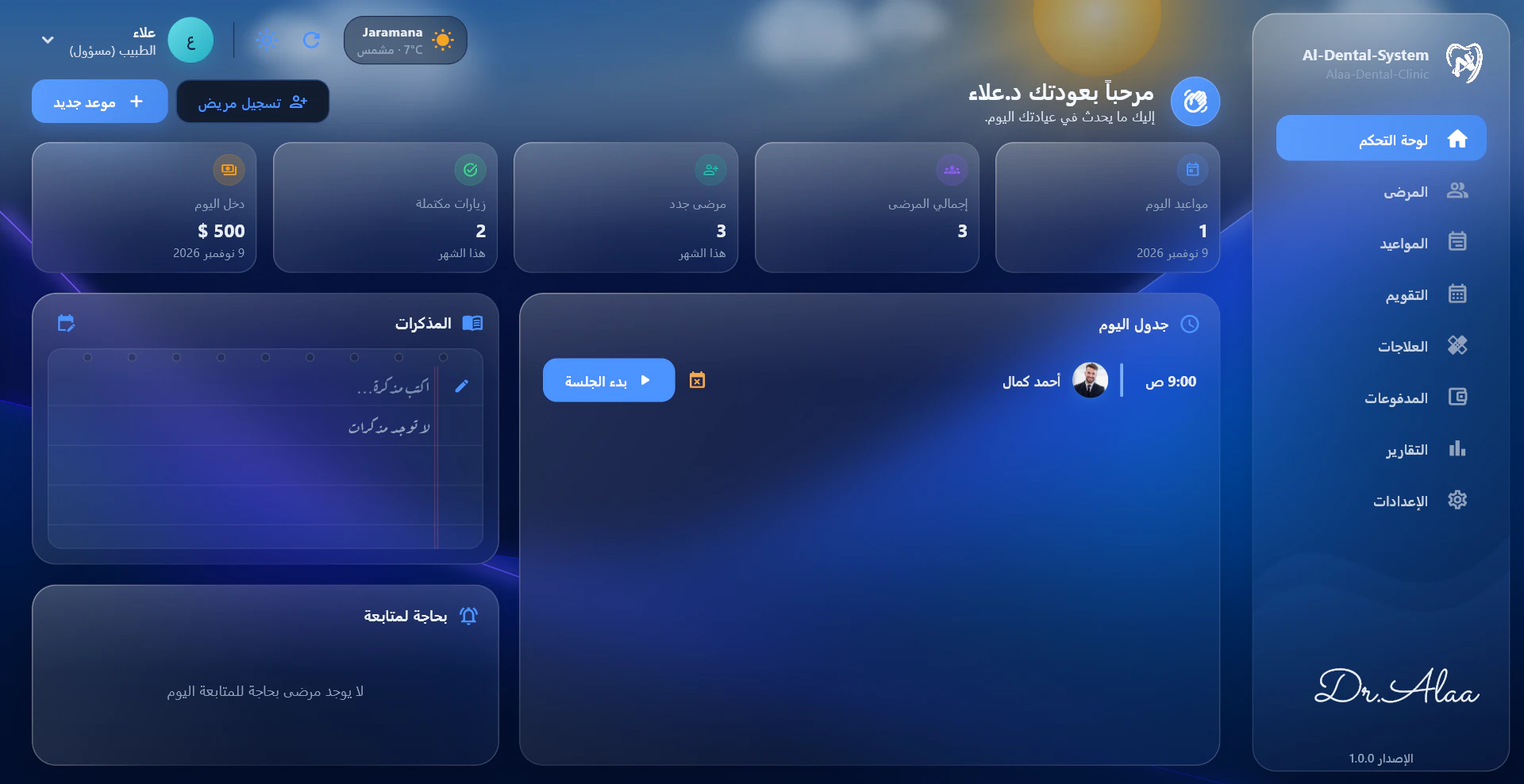
1234567
1Today's appointments
2Total patients
3New patients this month
4Completed visits
5Today's income
6Today's schedule, with one click to start the session
7Patients who need a follow-up
Patient management
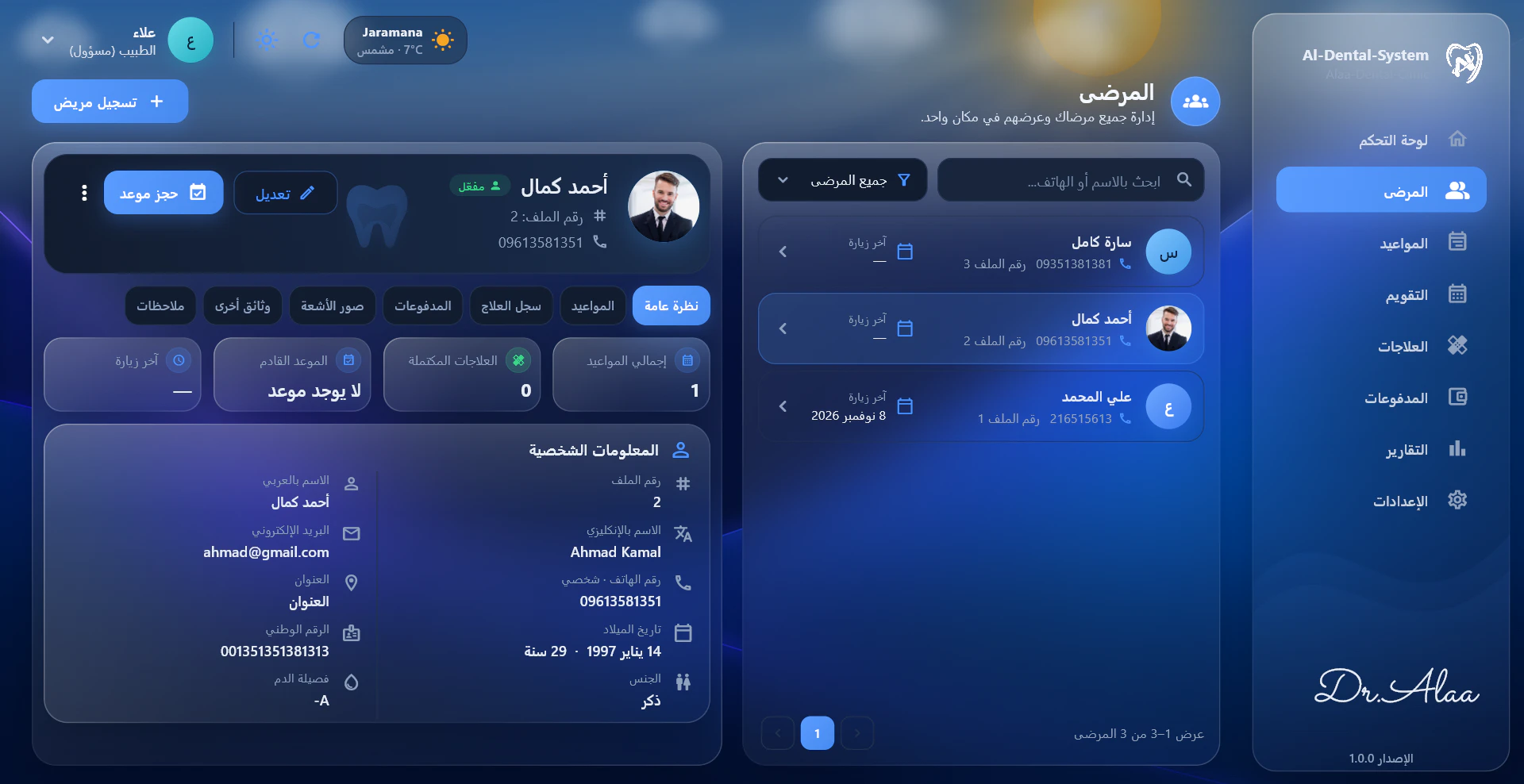
The full story of every patient, one click away
Each patient has a single profile that keeps everything together, from the first visit onwards.
Real screenshot of the app (Arabic interface)
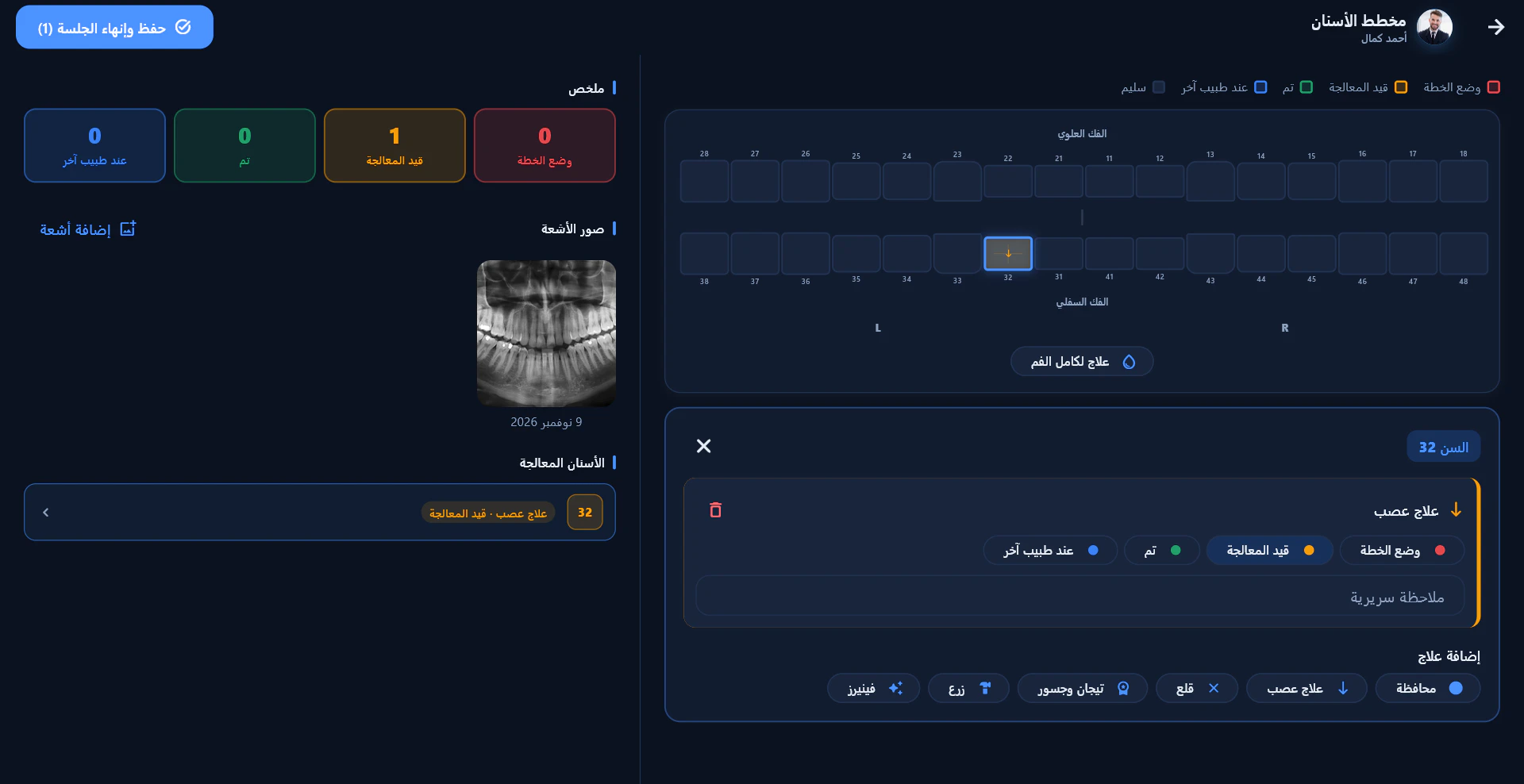
Dental chart & treatments
Chart treatments tooth by tooth
Select a tooth on the chart, add the treatment and set its status. Prices you enter are added to the patient's account automatically.
FDI tooth numbering
18171615141312112122232425262728
48474645444342413132333435363738
Real screenshot of the app (Arabic interface)
Every tooth shows its status
Planned
In progress
Done
With another doctor
Healthy
Your treatment list
Add, rename and remove treatments from Settings, each with its own icon and price. For example:
Filling
Root canal
Extraction
Crown
Implant
Your treatment
Whole-mouth treatments as well as single teeth
Treatment history on every tooth
Treatment types with your own names, icons and prices
X-rays added during the session
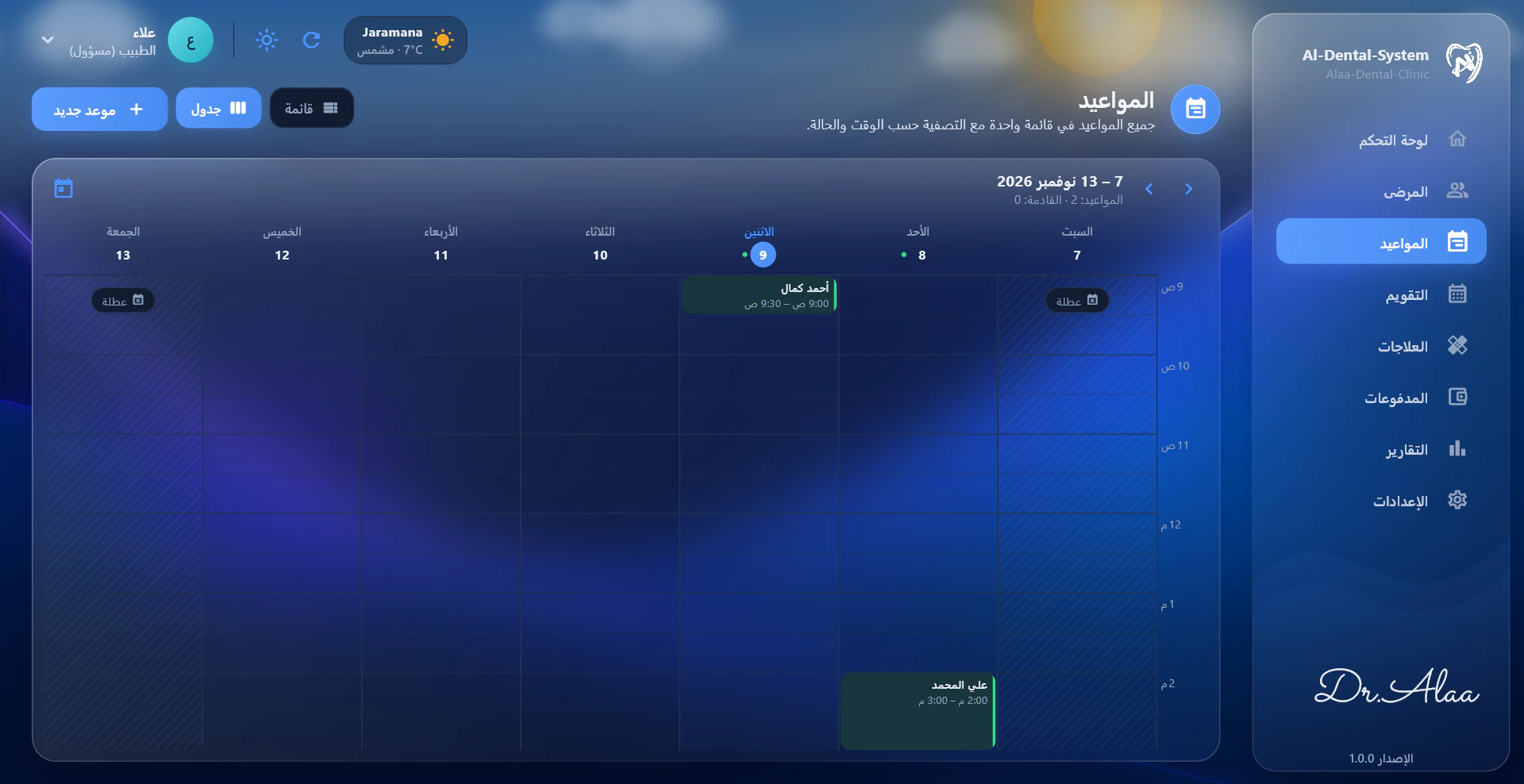
Appointment management
A calendar the whole front desk can work from
Book, move and track appointments in a week view or a list. Working hours and days off are built in, so no one is booked on a holiday.
An appointment's journey
BookedFrom the calendar or straight from the patient's profile.
Reminded on WhatsAppOne button opens WhatsApp with the reminder already written.
Session startedStart the session from today's schedule and open the dental chart.
CompletedSave and end the session. It counts toward completed visits.
Real screenshot of the app (Arabic interface)
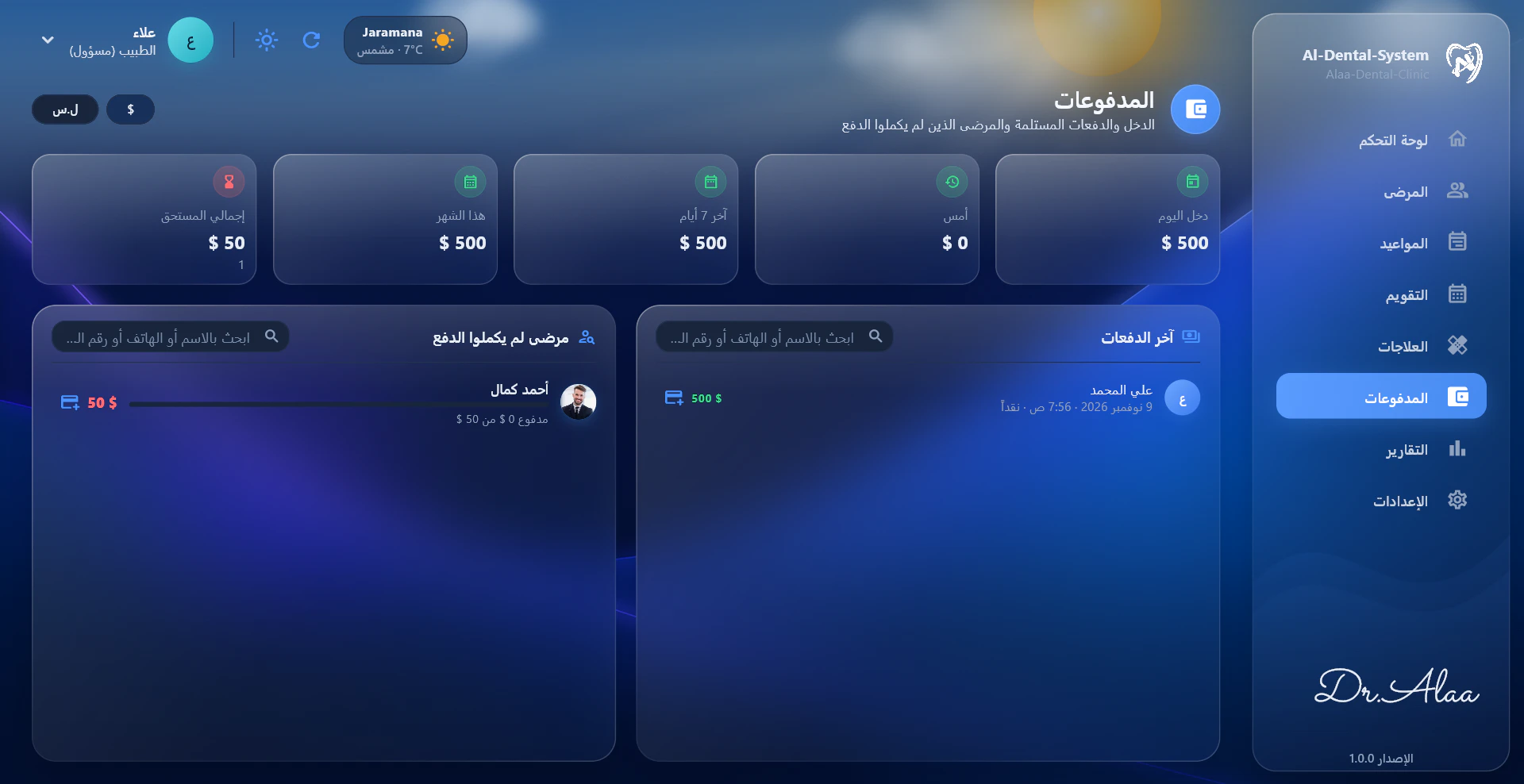
Payments & financial reports
Know what came in and who still owes
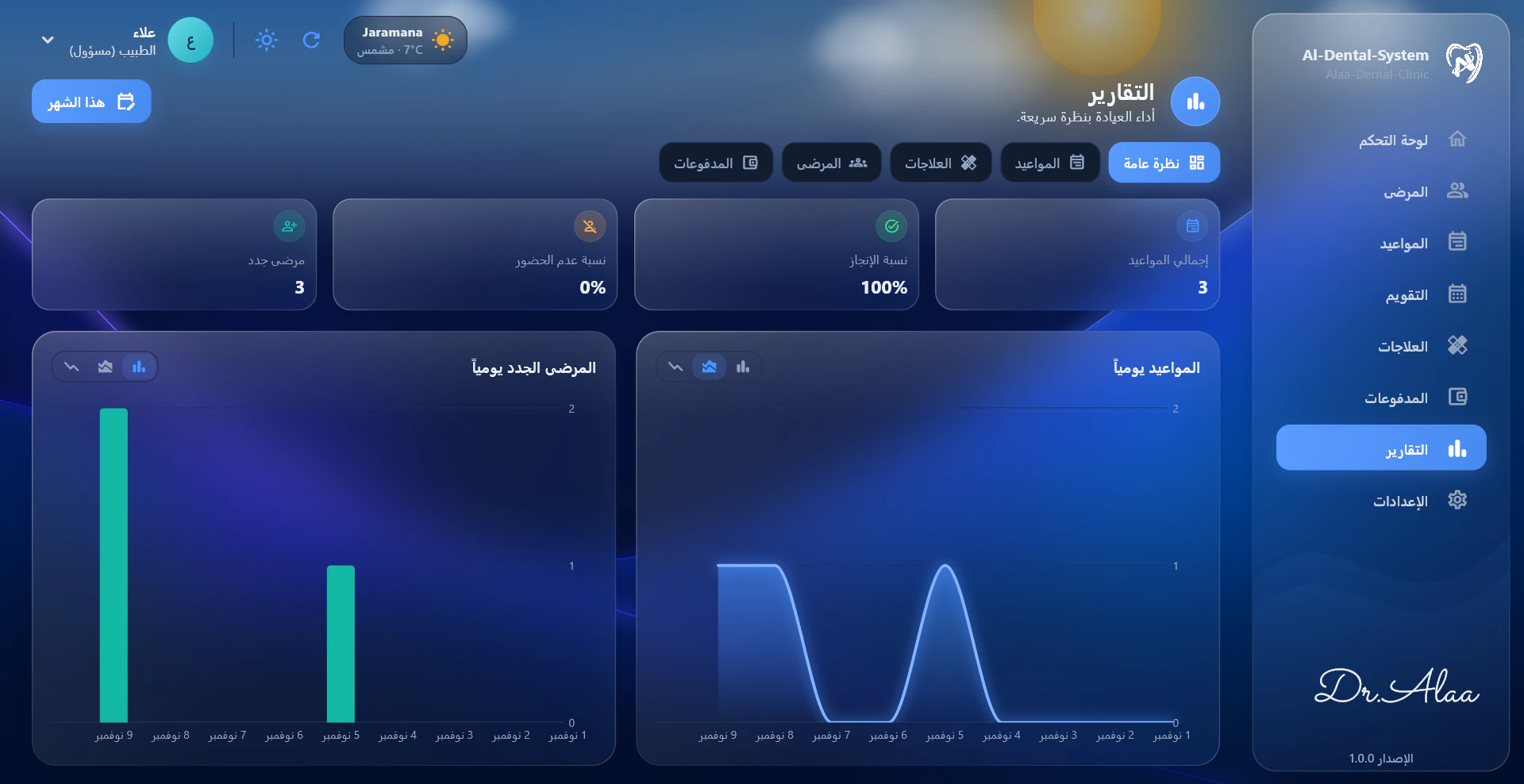
Record payments in the currencies you accept, track every patient's balance, and read the clinic's performance from clear charts.
Today's income
$500
Outstanding
$50
Completion rate
100%
No-show rate
0%
Figures from the screenshots above
Multiple currencies, with one set as the default
Payment methods and receipts in the language you choose
Balances and patients who haven't paid in full
Daily charts for appointments and new patients
Built to fit your clinic
A system that adapts to the doctor, not the other way round
Treatments, prices, working hours, currencies and even the lists in the patient form come from Settings. Every doctor sets the system up to match the way their clinic works, and can change it at any time.
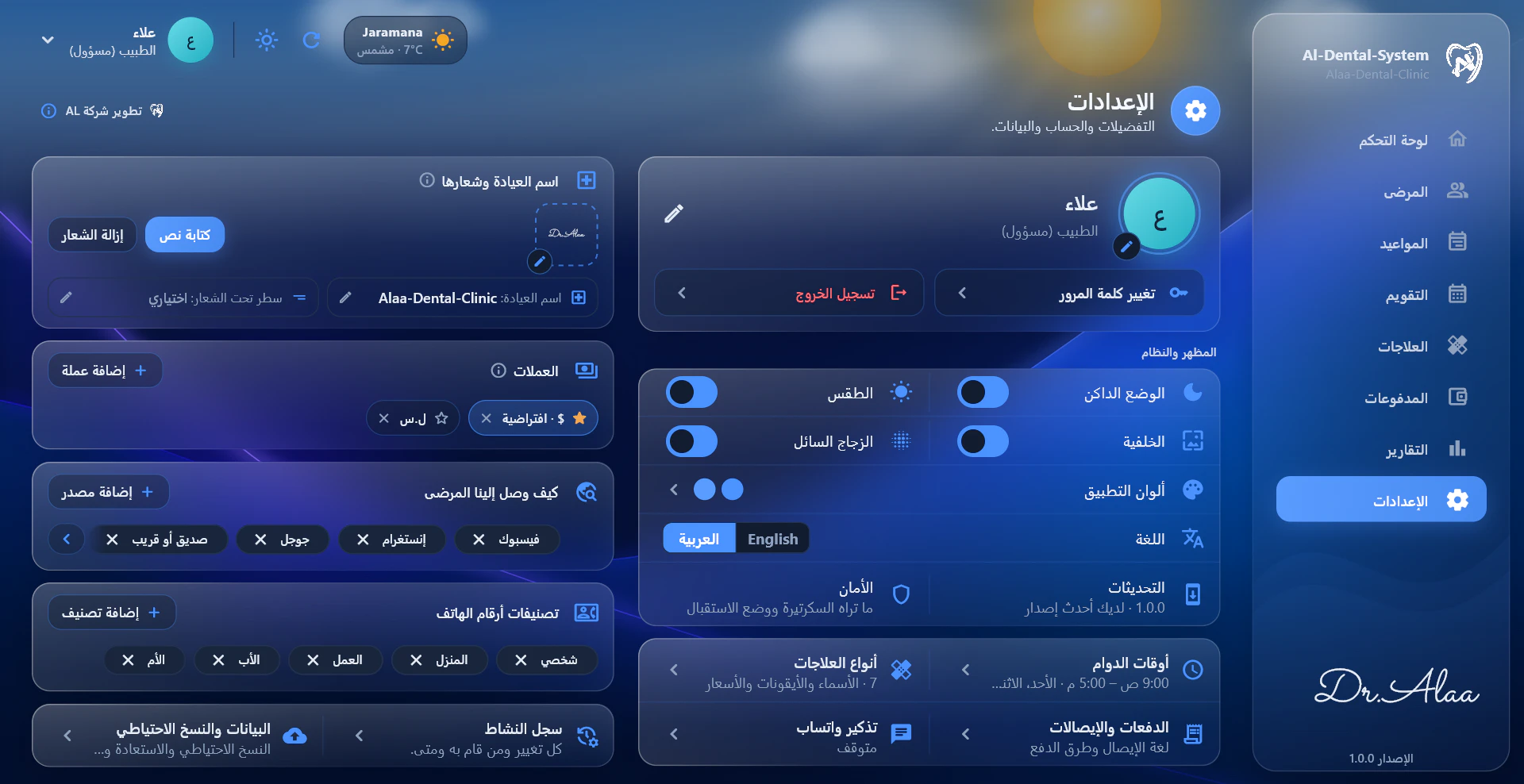
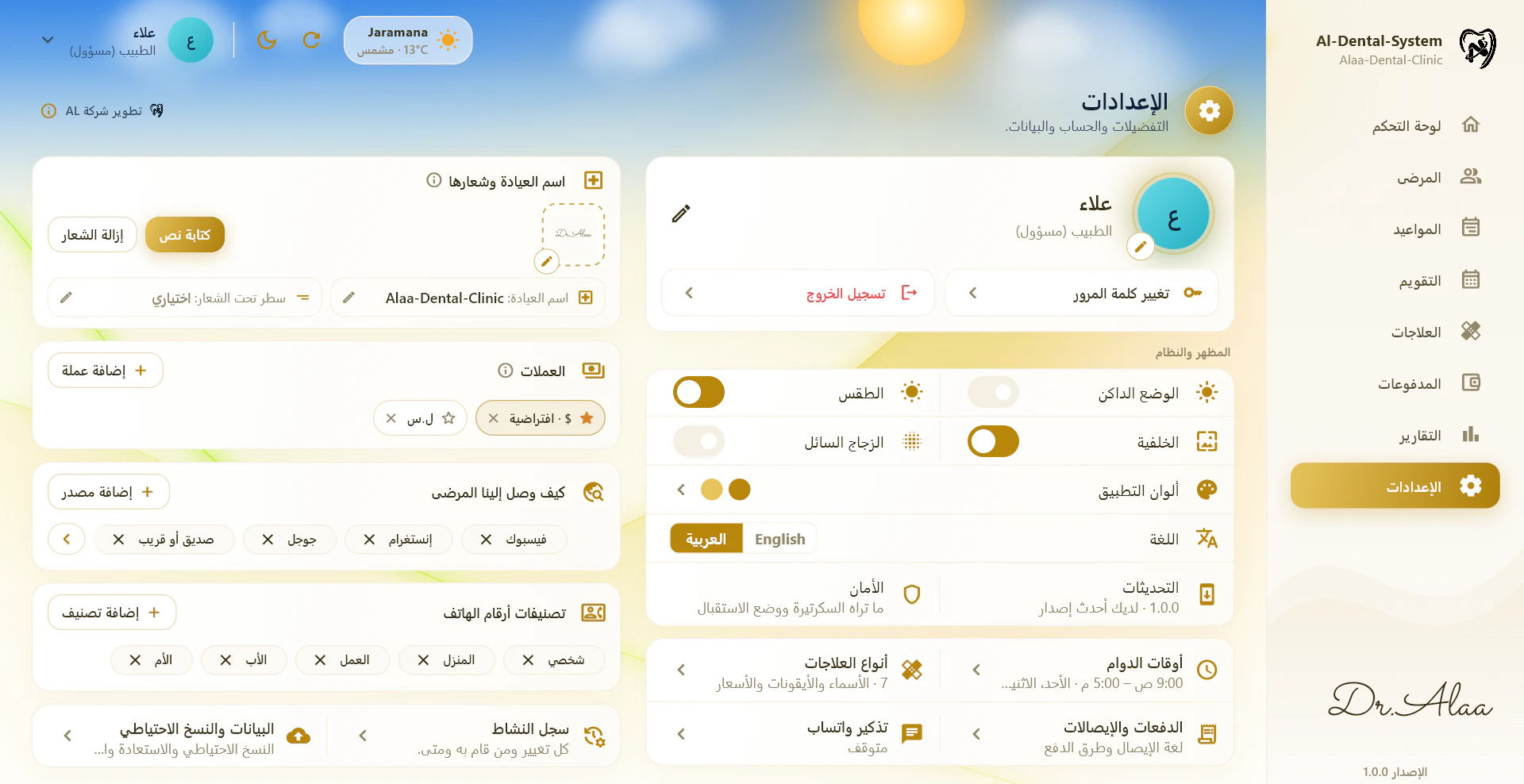
Choose a setting to see where it lives
Treatment typesAdd your own treatments and choose a name, icon and price for each. They appear on the dental chart straight away.
Real screenshot of the app (Arabic interface)
Team management
Everyone signs in. Everyone sees only what they should.
The doctor and the reception work on the same system, each with their own account. The doctor decides what reception can see.
Doctor (Admin)
Full access to patients, treatments, payments, reports and clinic settings.
Manages user accounts
Chooses what reception can see
Reads the activity log
Real screenshot of the app (Arabic interface)
Reception
Front-desk work with its own sign-in.
Books and manages appointments
Registers patients
Users, backups, settings and private notes stay hidden
Activity logEvery change, who made it, and when.
Reception mode lets the doctor hand over the screen without signing out. Only the doctor's password switches it back.
How it works
Up and running in three steps
There's nothing to migrate between modes later. Back up, switch, restore.
1
Choose your operating mode
Offline on the clinic's computer, or Cloud for access from different locations.
2
Configure your clinic
Add your clinic name and logo, working hours, currencies, treatment prices and user accounts.
3
Manage your clinic from one application
Patients, charts, appointments, payments and reports, all in one place.
Offline & Cloud
Your Clinic. Your Choice.
Two ways to operate. One powerful dental management system.
Offline
Everything stays on the clinic's computer.
Clinic computer
Encrypted backup
Google Driveoptional
Runs without an internet connection
Data stored on the clinic's computer
Licensed to the specific computer
Encrypted local backups
Optional Google Drive backups
Internet not required
Cloud
Your data in a cloud database, reachable from where you work.
Clinic
Reception desk
Doctor's phone
Cloud database
Cloud-hosted database
Access through authorized user accounts
Access from different locations
Automatic cloud backups
Internet connection required
Works on computers and phones (Android & iOS)
Internet required
Same Core Features. Two Ways to Run.
Mobile app
Your clinic, in your pocket.
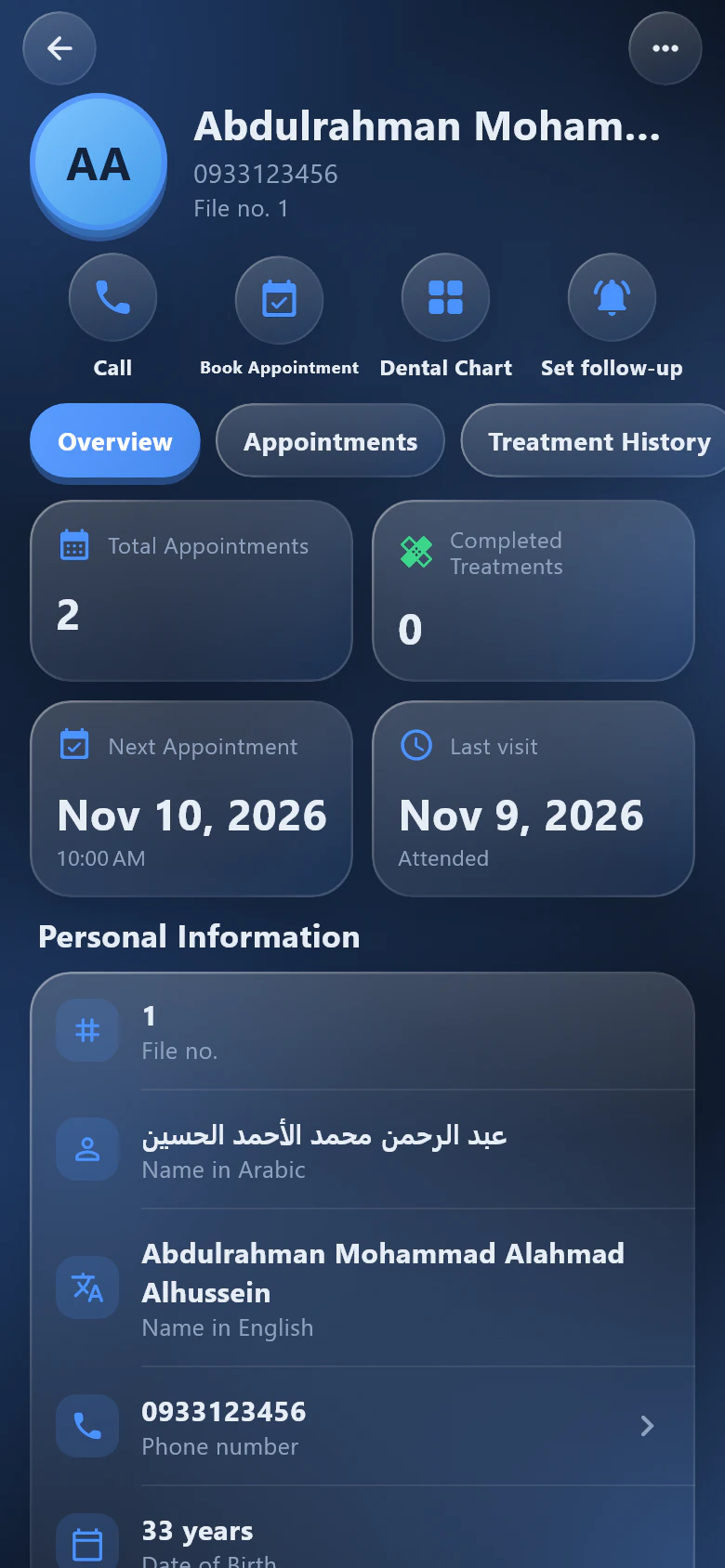
The app also runs on Android and iOS, with screens designed for the phone instead of a shrunken desktop. Phones work in Cloud mode and share the same data as the clinic's computers.
Link a phone once by scanning the QR code shown on the clinic's computer
Patients, appointments, payments and reports wherever you are
Notifications when an appointment is booked or changed
Arabic and English, just like the desktop
Phones use Cloud mode and need an internet connection.
Real screens from the app's phone version
Security & data protection
Your Clinic's Data Deserves Protection.
Patient records are the heart of a clinic. The system protects them with backups you control and access you decide.
Encrypted backupsBackup files are encrypted and protected by a password you set. Without it, the file cannot be opened.
Local backup storageAutomatic backups to a folder you choose, such as another drive or a USB disk, with restore points.
Google Drive, if you want itIn Offline mode you can also keep backups on Google Drive. It's optional.
Cloud databaseIn Cloud mode your data lives in a cloud database with automatic backups.
Controlled permissionsSeparate accounts for doctor and reception, with an activity log of every change.
FAQ
Questions clinics ask us
Can't find your answer? Ask us directly and we'll walk you through it.
Yes, in Offline mode. The application and all data run on the clinic's computer, so no connection is needed. Cloud mode stores data online, so it needs an internet connection.
What is the difference between Offline and Cloud?
Both include the same core features. Offline keeps the data on one licensed computer with encrypted local backups and optional Google Drive backups. Cloud keeps the data in a cloud database, so authorized users can sign in from different locations.
Can I manage multiple users?
Yes. The doctor has an admin account and can create reception accounts. The doctor chooses what reception sees, and the activity log records every change and who made it.
Does the application support Arabic?
Yes. The whole application works in Arabic and English, with a proper right-to-left layout for Arabic. You can switch language at any time from Settings.
Is there a mobile app?
Yes, for Android and iOS, with screens designed for the phone. Phones work in Cloud mode and share the same data as the clinic's computers. You link a phone once by scanning the QR code shown on the clinic's computer under Settings, then Phones. Offline mode runs on the clinic's computer only.
Can I back up my data?
Yes. Offline mode makes automatic, password-protected encrypted backups to a folder you choose, with Google Drive as an option. Cloud mode keeps your data in a cloud database with automatic backups.
Can I set the system up for my own clinic?
Yes. From Settings you add your own treatments with their icons and prices, working hours, currencies, payment methods, patient sources and phone labels, your clinic name and logo, the WhatsApp message, and the app's look and language. You can change any of it later.
Can I manage multiple currencies?
Yes. Add the currencies you accept, choose a default, and record each payment in its own currency.
How do WhatsApp reminders work?
Turn them on in Settings and write your message once. The patient's name, date, time and clinic name are filled in for you. Each appointment then has a WhatsApp button that opens the chat with the reminder ready, and you just press Send.
How can I request a demonstration?
Fill in the short form below with your name, clinic and phone number. We'll contact you to arrange a walkthrough of the application.
Take Control of Your Dental Clinic.
Everything you need to organize, manage, and grow your dental practice.